
PQC Discovery and Scoped Remediation
Solution Guide


This guide provides practitioner-focused instructions for deploying, configuring, and running the pqc.ansible collection. This collection assesses Post-Quantum Cryptography (PQC) readiness across RHEL 8/9/10 and provides automated remediation for system crypto-policies, SSH, and nginx.
Why PQC is Important
Quantum computers are advancing rapidly and will eventually be capable of breaking the public-key cryptography (like RSA and ECC) that currently secures the internet and enterprise infrastructure. While cryptographically relevant quantum computers do not yet exist, organizations face an immediate threat from “Store Now, Decrypt Later” attacks. Adversaries are actively harvesting encrypted data today with the intention of decrypting it once quantum computers become available.
To mitigate this, NIST has standardized new quantum-resistant algorithms (such as ML-KEM for key encapsulation and ML-DSA for digital signatures). Transitioning infrastructure to these new standards is a complex, multi-year effort that requires deep visibility into where legacy cryptography is currently deployed.
How this Collection Helps
The pqc.ansible collection provides an automated, scalable way to manage the PQC transition across your RHEL infrastructure:
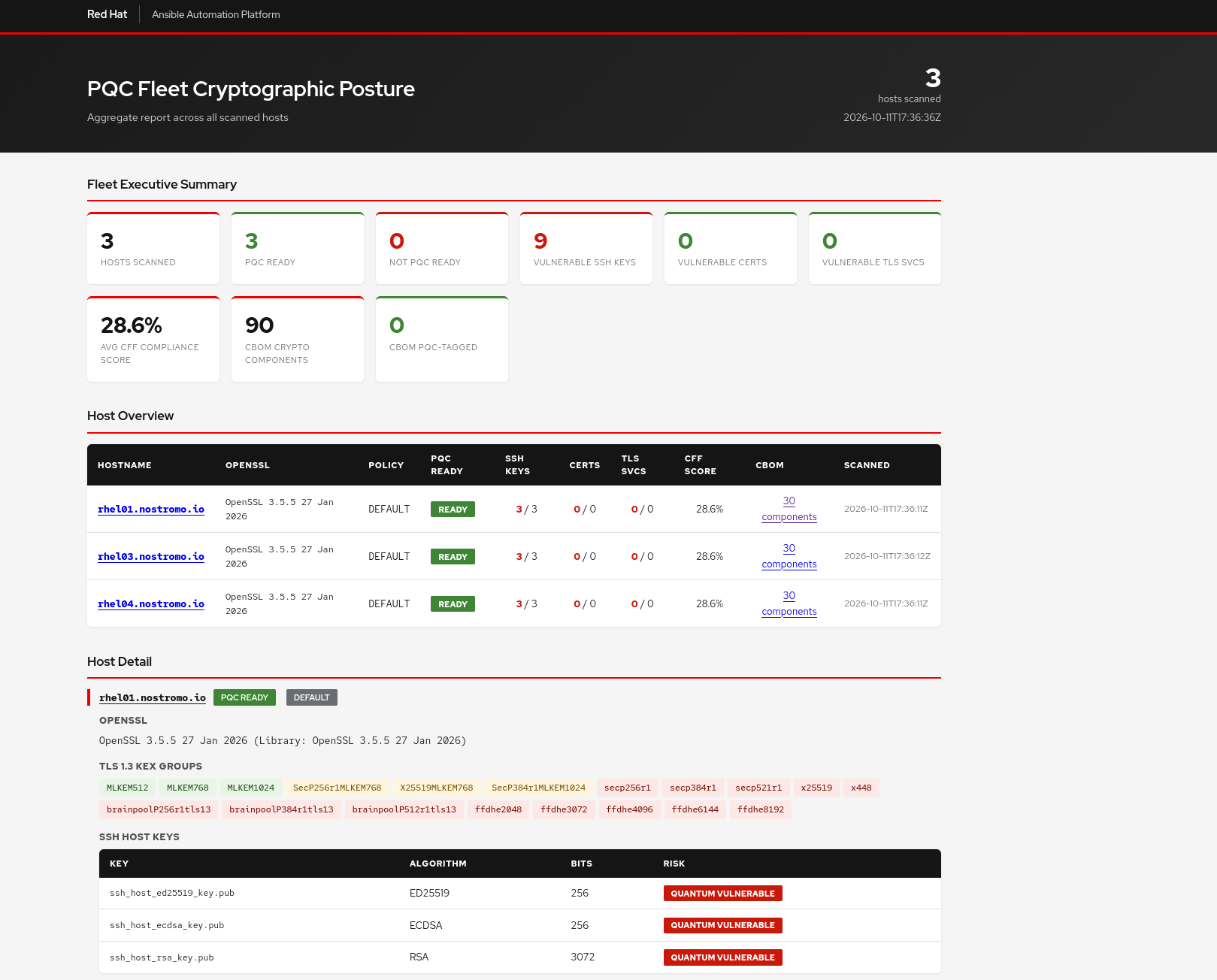
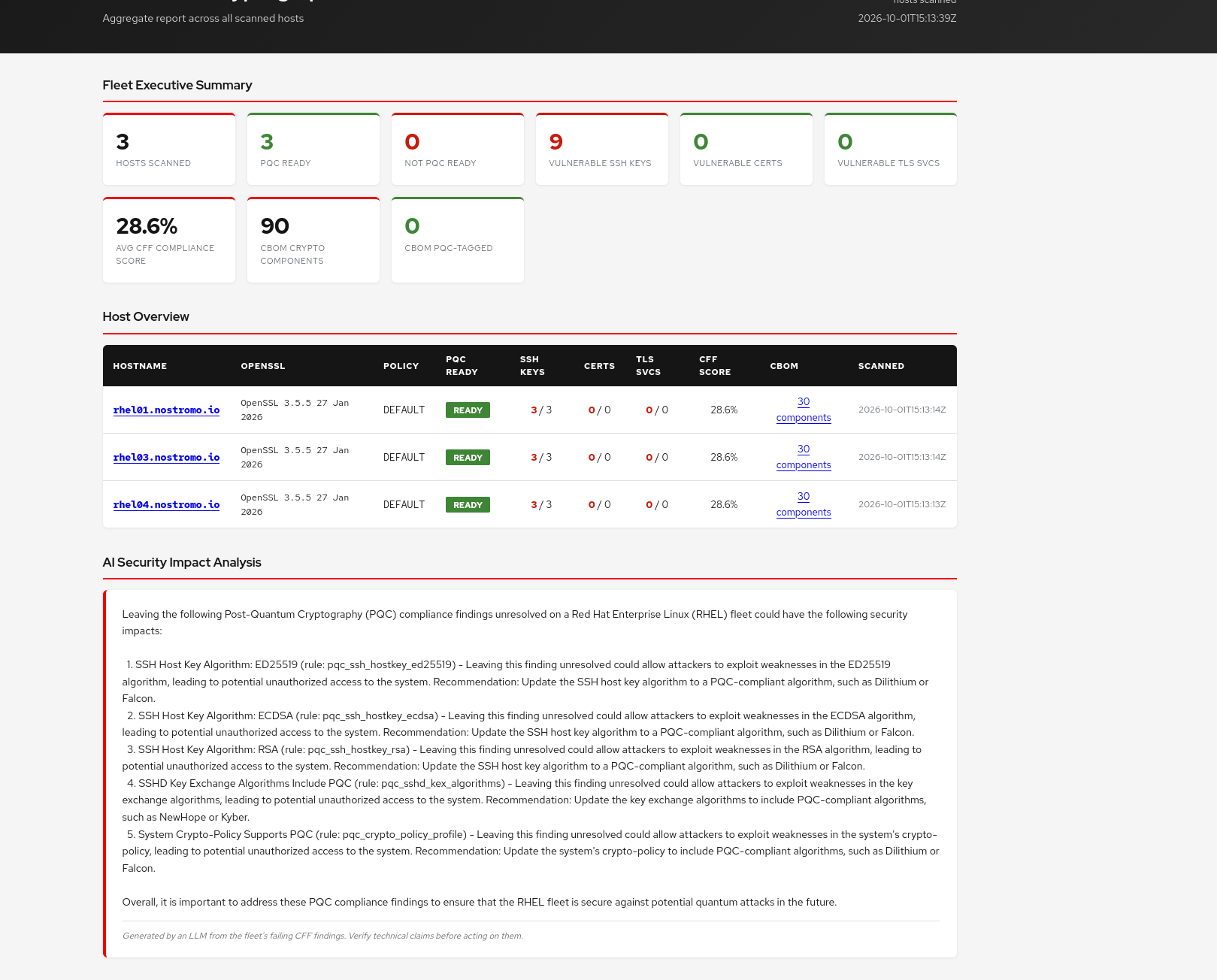
- Discovery & Visibility: The collection scans systems without making changes, identifying legacy cryptography in use across certificates, SSH configurations, active TLS services, and system crypto-policies.
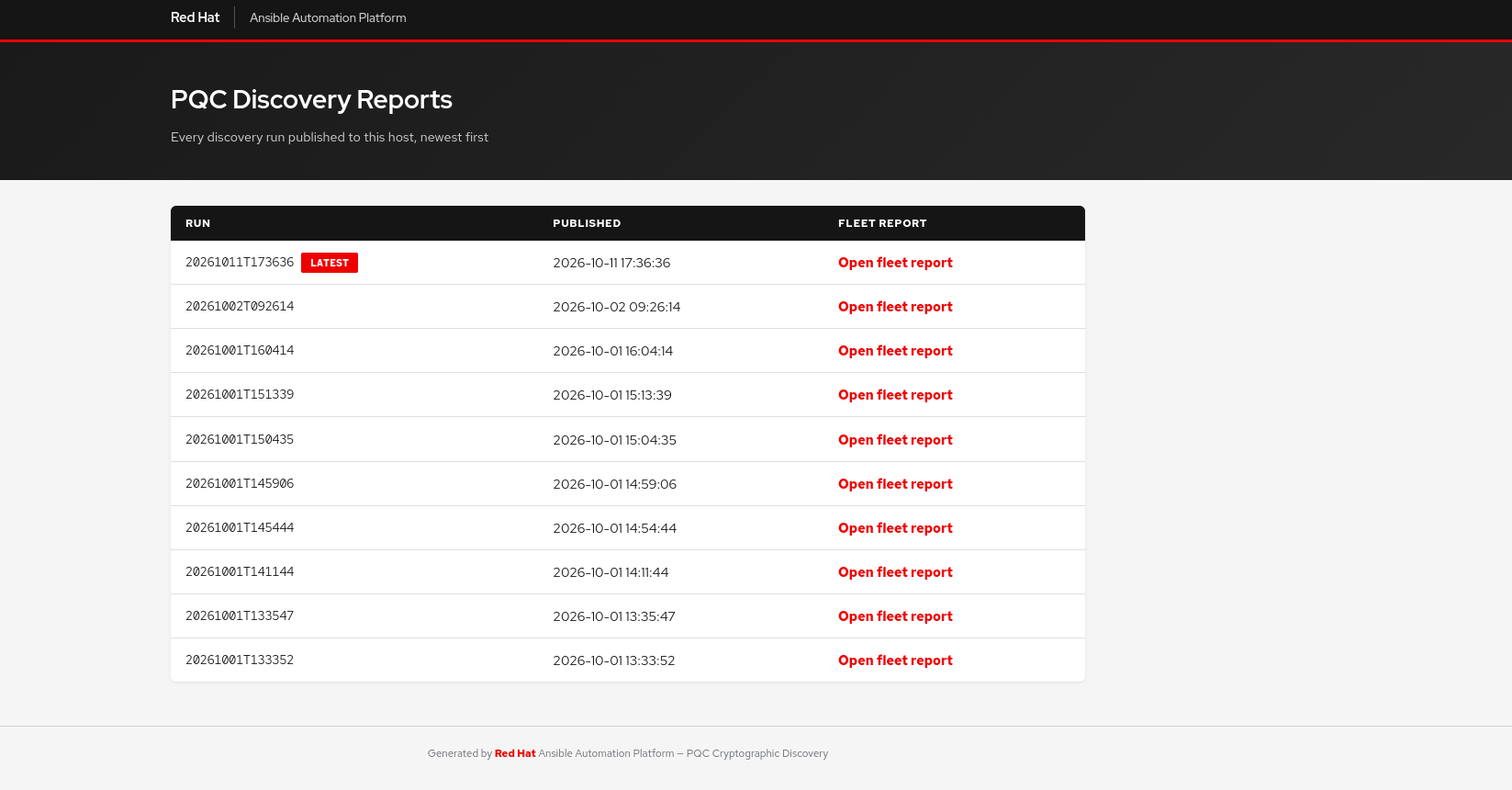
- Compliance Reporting: It normalizes findings into standard formats (Common Findings Format v1.0.0 and CycloneDX v1.6 CBOM) to integrate with compliance dashboards like Backstage.
- Automated Remediation: It provides targeted playbooks to enforce PQC standards safely. This includes enabling ML-KEM hybrid key exchange in SSH and nginx, and updating the RHEL system-wide crypto-policy to support post-quantum modules–all with built-in dry-run and validation checks to prevent outages.
1. Prerequisites and Environment Setup
Automation Controller Requirements
- Ansible Version: >= 2.16.0
- Execution Environment (EE): Must include the following collections:
community.crypto>= 2.0.0ansible.posix>= 1.5.0community.general>= 5.0.0ansible.windows>= 2.0.0
Target Host Requirements
- Linux: RHEL 8, RHEL 9, or RHEL 10.
- Windows: Supported for read-only discovery (Schannel, OpenSSH, Certificates) over WinRM.
Required Credentials in AAP
- Machine Credential: Standard SSH credential with privilege escalation (
become: true) to scan system directories and apply remediation.
2. Configuration & Variables
The behavior of the discovery and remediation roles is controlled via variables. These are typically set in group_vars/all.yml or passed as extra variables in the Job Template.
Discovery Variables (crypto_posture_snapshot)
| Variable | Default | Description |
|---|---|---|
pqc_collect_packages |
true |
Gather OpenSSL package versions and RPM signature tooling. |
pqc_collect_openssl |
true |
Check OpenSSL version, TLS 1.3 groups, KEM algorithms, and providers. |
pqc_collect_sshd |
true |
Inspect effective sshd KEX, host key algorithms, ciphers, and MACs. |
pqc_write_html_report |
false |
Generate per-host and fleet aggregate HTML reports. |
pqc_write_cbom |
false |
Generate CycloneDX v1.6 CBOM per host. |
pqc_certificate_scan_paths |
['/etc/pki/tls/certs', '/etc/pki/ca-trust/source/anchors', '/etc/ssl/certs'] |
Filesystem paths to scan for system certificates. |
pqc_tls_probe_ports |
[443, 8443, 636, 993, 995] |
TCP ports to probe for active TLS services. |
Tip: Disable specific
pqc_collect_*variables if you want to speed up the scan by skipping certain checks (e.g.,pqc_collect_system_certs: falseif you have massive certificate stores).
Remediation Variables (remediate.yml)
The remediation playbooks support a strict dry-run mode. Ensure these are exposed as Survey prompts in AAP.
| Variable | Default | Description |
|---|---|---|
remediate_crypto_dry_run |
true |
Assess the PQC subpolicy without applying it. |
remediate_nginx_dry_run |
true |
Assess nginx TLS groups without writing the snippet. |
remediate_sshd_dry_run |
true |
Assess SSH KEX without writing the drop-in. |
3. Step-by-Step Deployment
Step 3.1: Import the Project into AAP
- Navigate to Projects in Automation Controller and click Add.
- Set Source Control Credential Type to Git.
- Set Source Control URL to your repository URL (e.g.,
<a target="_blank" href="https://github.com/nmartins0611/pqc.ansible">https://github.com/nmartins0611/pqc.ansible</a>). - Check Update Revision on Launch.
Step 3.2: Configure the Discovery Job Template
Create a Job Template to run the read-only PQC assessment:
- Name: PQC Discovery
- Job Type: Run
- Inventory: Select your target RHEL inventory
- Project: Select the PQC project
- Playbook:
playbooks/pqc_pipeline.yml(for Backstage integration) OR create a custom playbook calling thepqc.ansible.crypto_posture_snapshotrole. - Credentials: Select your Machine Credential.
- Variables:
pqc_write_html_report: true
pqc_write_cbom: true
Step 3.3: Configure the Remediation Job Template
Create a Job Template to apply PQC hardening:
- Name: PQC Remediation
- Job Type: Run
- Playbook:
playbooks/remediate.yml - Credentials: Select your Machine Credential.
- Variables:
remediate_crypto_dry_run: true remediate_nginx_dry_run: true remediate_sshd_dry_run: true - Enable Survey: Create a survey to prompt the user to toggle the dry-run variables to
falsewhen they are ready to apply changes.
4. Execution
Running Discovery
Trigger the PQC Discovery Job Template.
- Expected Runtime: 10-30 seconds per host, depending on the number of certificates in the scan paths and active TLS ports.
- Impact: Zero. The discovery role is strictly read-only.
Running Remediation
- Trigger the PQC Remediation Job Template with all dry-run variables set to
true. - Review the job output. The playbook runs validation commands (e.g.,
sshd -t,nginx -t) against the proposed configurations. - Relaunch the Job Template, setting the dry-run variables to
falseto apply the changes.
Tip: The
remediate_sshdrole prepends PQC KEX algorithms to the existing list. It does not remove classical algorithms, ensuring AAP Controller does not lose SSH connectivity.
5. Verification
Run the following commands on target systems to prove the automation successfully applied the PQC configurations:
Verify System Crypto-Policy:
update-crypto-policies --show
# Expected output on RHEL 9.7+: DEFAULT:TEST-PQ or DEFAULT:PQ
# Expected output on RHEL 10.1+: DEFAULT (PQC is native)
Verify SSH Key Exchange:
sshd -T | grep kexalgorithms
# Expected output: mlkem768x25519-sha256 must be the first algorithm in the comma-separated list.
Verify nginx Configuration:
nginx -t
# Expected output: nginx: configuration file /etc/nginx/nginx.conf test is successful
Verify Local TLS 1.3 Handshake:
openssl s_client -connect localhost:443 -tls1_3 </dev/null
# Expected output: Should complete a successful TLS 1.3 handshake.
6. Troubleshooting
| Failure Mode | How to Read the Logs | Specific Fix |
|---|---|---|
| SSH Remediation Fails Validation | The remediate_sshd role fails during the sshd -t validation step and removes the drop-in. |
Check if the target OpenSSH version supports the injected KEX algorithms. Ensure you are running RHEL 9.7+ or RHEL 10. |
| Empty Reports / Missing Hosts | The discovery play silently skips the report generation step. | Ensure pqc_report_publish_host is correctly defined in your inventory and accessible by the playbook. |
| Backstage Ingestion Fails | HTTP 401/403 or Connection refused during the POST findings to Backstage task. |
Verify the backstage_api_url and ingest_token variables are correctly injected by the compliance plugin. |
| nginx Remediation Fails | The remediate_nginx_tls role fails the nginx -t check. |
Verify the OpenSSL version on the host supports the X25519MLKEM768 TLS group. OpenSSL 3.5+ is required. |