AIOps automation with Ansible
Solution Guide
Ansible unlocks AIOps
Overview
Traditional event-driven automation is deterministic – for every event you want to handle, you write a specific rule and a corresponding action. Ten known failure scenarios means ten rules. A hundred means a hundred. This creates a linear scaling problem: as your IT environment grows in complexity, so does the number of rules you must author, test, and maintain.
| Approach | Events | Rules Required | Actions |
|---|---|---|---|
| Traditional event-driven | 10 | 10 | 10 |
| Traditional event-driven | 100 | 100 | 100 |
| Traditional event-driven | 1,000 | 1,000 | 1,000 |
| AIOps with Event-Driven Ansible (EDA) | 1,000 | Few rulebooks (+ AI inference) | Curated or governed |
AIOps breaks this linear relationship by inserting AI inference between the event and governed Ansible execution. Most production paths enrich signals or select from pre-approved job templates rather than generating new playbooks at incident time. This guide maps operational patterns (Crawl/Walk/Run), partner integrations, and the curated remediation workflow most teams deploy. For the hands-on workshop pipeline, see Self-healing infrastructure (use case 6).
Background
AIOps stands for artificial intelligence for IT operations. It refers both to a modern approach to managing IT operations and to the software systems that implement it. AIOps uses data science, big data, and machine learning to augment–or even automate–many traditionally manual IT tasks. The goal is to improve issue detection, root cause analysis, and system resolution.

There are three major parts of AIOps:
 Observability
 Inference
 Automation
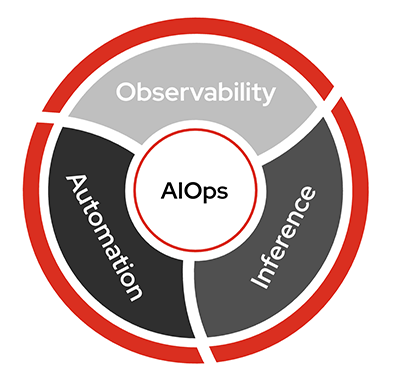
- Observability: Understanding the internal state of a system through logs, metrics, and traces.
- Inference: Using AI models to make predictions based on new data.
- Automation: Automatically detect, respond to, and resolve IT issues.
Ansible Automation Platform connects observability and inference to build self-healing infrastructure. Adoption is incremental: start with the loop that matches your maturity stage, then add inference, orchestration, and deeper Red Hat AI capabilities when a use case benefits from them.
Where AIOps sits in the automation stack
Organizations usually run more than one kind of automation initiative at the same time. These are the common types – not a ladder you must climb:
| Automation | What it does |
|---|---|
| Task-based | Run known playbooks on a schedule or trigger |
| Event-driven | React to known conditions with pre-written rules |
| Agent-driven | Handle novel situations with real-time contextual judgment |
Most teams still lean heavily on task-based work, with event-driven adoption growing and agent-driven still emerging. AIOps with Ansible bridges event-driven and agent-driven: AI inference enriches signals or helps pick the right unit of automation your team already built and approved – a job template or workflow in AAP such as “restart httpd,” “expand /var to 80 GB,” or “patch CVE-2024-6387” – then AAP executes with governance. That is Crawl/Walk in this guide – not a fully autonomous agent on day one. Deeper Run autonomy still stays inside policy and the same approved automation.
Solution
Ansible Automation Platform is the trusted execution and orchestration layer for AIOps. Partner observability, ITSM, and cloud tools supply signals; AAP and EDA close the loop with auditability and RBAC.


Who Benefits
| Persona | Challenge | What They Gain |
|---|---|---|
 IT Ops Engineer / SRE IT Ops Engineer / SRE |
Manually triaging alerts and repeatedly running the same diagnostics | Faster triage, AI-enriched context, and execution from existing approved job templates |
 Automation Architect Automation Architect |
Event-driven workflows that outgrow deterministic rules | Reference patterns for EDA, inference, curated remediation, and optional orchestration – any observability or ITSM partner |
 IT Manager / Director IT Manager / Director |
Justifying AI investment while managing operational risk | Crawl/Walk/Run adoption, measurable MTTR gains, governance before autonomous Run |
Common AIOps use cases
Six operational patterns for customer conversations. AI identifies opportunities; automation delivers outcomes. Each row below maps to Crawl, Walk, or Run (see maturity chips).
How work starts
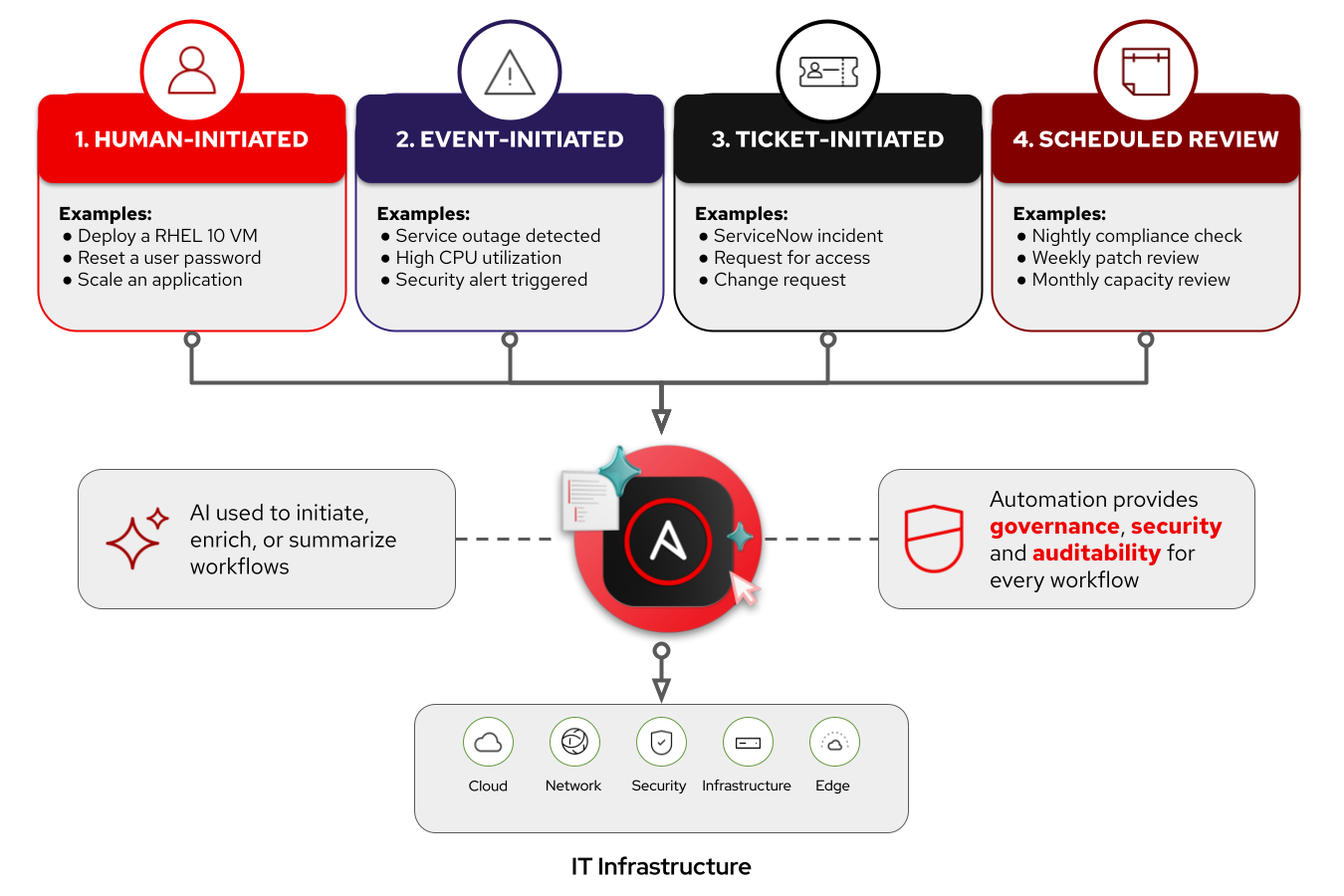
Each pattern has its own AIOps Use Case page (adoption path, partner links, validation). Pick a row below or open the Common AIOps Use Cases hub.
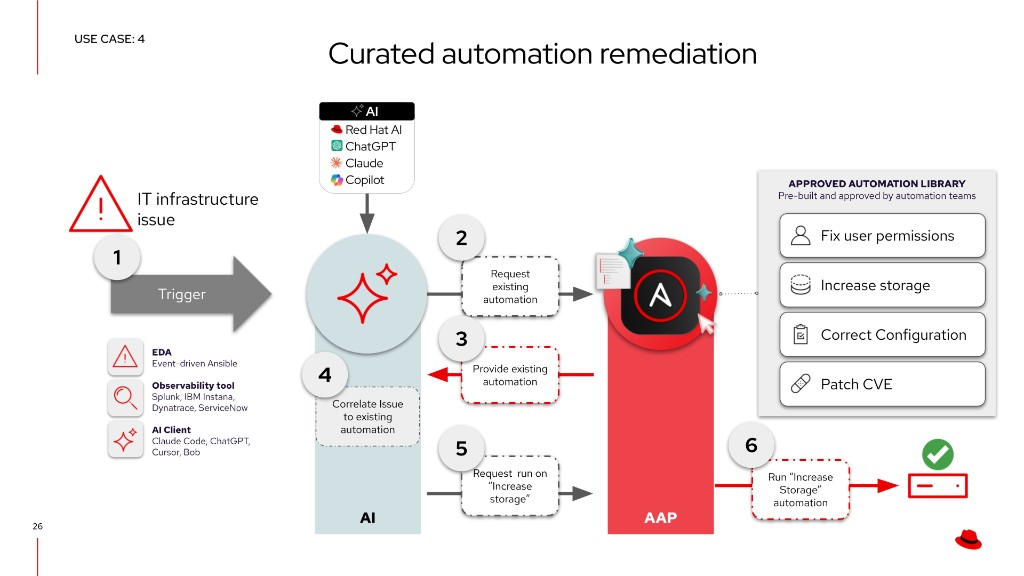
This foundational guide’s AIOps workflow is a high-level walkthrough of use case 4 – Curated Automation Remediation. That use-case page will grow more detailed and opinionated over time (examples, labs, Arcade). Open it from the strip when you want the dedicated pattern guide.
Prerequisites
Requirements depend on which use case or partner guide you implement.
Ansible Automation Platform
- Ansible Automation Platform 2.5+ – Required for enterprise EDA (baseline for this guide).
- Ansible Automation Platform 2.7+ – Required when you adopt Automation orchestrator (approvals, task agents, and logic steps) or the AAP Model Context Protocol (MCP) server (library search and governed launch from an AI client).
Event sources
You need at least one way for symptoms to reach automation – a ticketing system, an observability platform, or both. Partner Solution Guides cover specific stacks; examples include:
- Observability – IBM Instana, Splunk, and similar alert or metric sources that can feed EDA (webhook, plugin, or message bus)
- ITSM / tickets – ServiceNow and similar systems where incidents or change requests start the loop
- Optional inference – Red Hat AI or another OpenAI-compatible endpoint when you enrich signals before enrichment or selection
Tip: Want event examples and vendor detail?
Skip to 1. Detect in the AIOps workflow – event tables, observability tools, and message buses are walked through there.
Red Hat Lightspeed (optional)
For CVE and Advisor remediations, Red Hat Lightspeed publishes curated playbooks your teams promote into the approved library. That is not Automation code assistant (authoring-time drafts). See Trusted sources for the approved library.
Terminology update – Lightspeed rebranding.
Red Hat has consolidated its AI-powered services under the Lightspeed brand. Ansible Lightspeed Code Assistant is now Automation code assistant (supports Gemini, Red Hat AI, or IBM watsonx). Ansible Lightspeed Intelligent Assistant is now Automation intelligent assistant. Red Hat Insights (console.redhat.com) is now Red Hat Lightspeed. The functionality is the same – only the branding has changed. This guide uses both old and new names where they appear in existing code and screenshots.
AIOps workflow
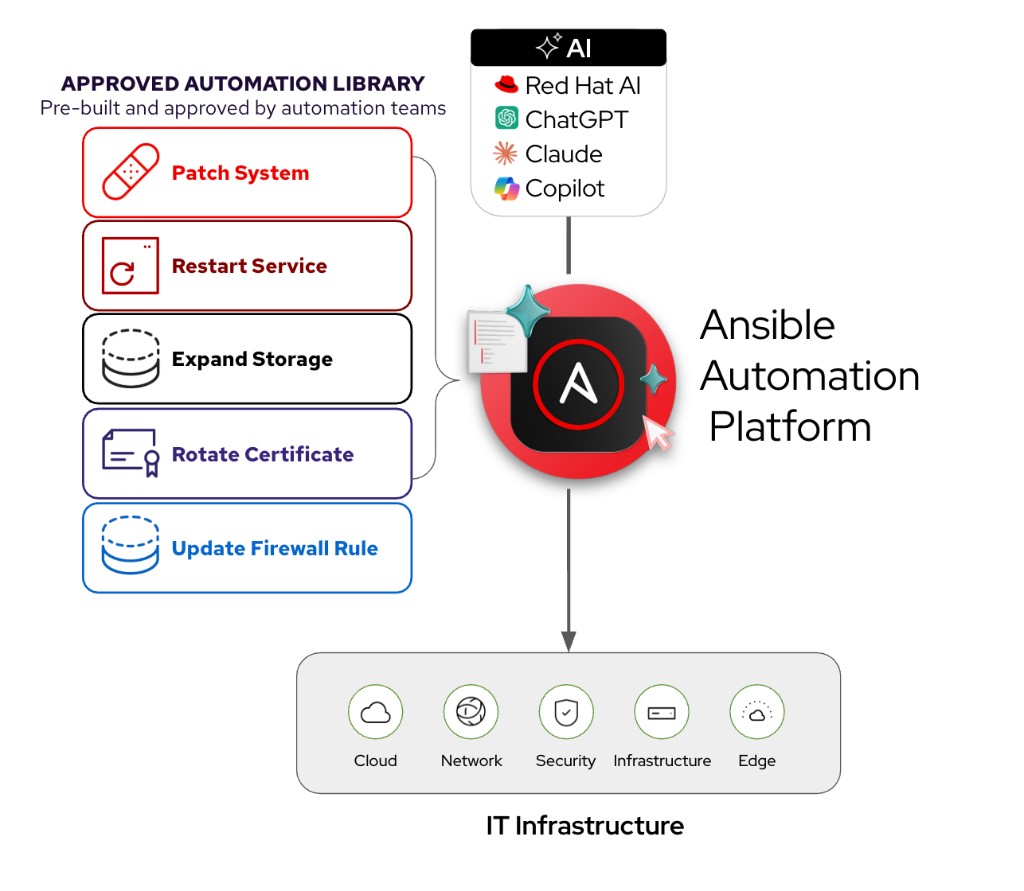
The default production pattern is curated automation remediation: when an incident arrives, the AI assistant uses the AAP MCP server to search Ansible Automation Platform for units of automation – job templates and workflows – your team has already built, tested, and approved. It selects the best match – the same way a senior engineer would say “run the disk-expand template on that host” – and requests a governed run. Nothing new is invented at incident time, which keeps audit trails, RBAC, and change control intact.
The sections below are a high-level walkthrough of that pattern – the same loop as Curated Automation Remediation (use case 4). Use that page for the dedicated use-case narrative; expect it to gain deeper examples, demos, and Arcade content as it matures. This foundational guide stays the shared Detect → MCP search → Correlate and select → Execute path.
Why select instead of generate?
Generating playbooks from an alert introduces unreviewed change every time the same symptom recurs. Teams already maintain trusted automation in AAP. MCP exposes that library to the AI client so inference chooses from approved options instead of authoring fixes from thin air.
EDA is included in Ansible Automation Platform. The four sections below map to the curated path:
- Detect – observability, ITSM, or an operator surfaces a symptom.
- MCP search – the AI client lists approved job templates and workflows in AAP.
- Correlate and select – inference picks from the library (or a short list for approval).
- Execute approved job – governed run with guardrails and validation.
1. Detect
Something must detect a symptom and reach EDA, an ITSM ticket, or an AI client before MCP search runs. The tables below are vendor-neutral patterns – not a checklist to deploy all at once.
What can trigger automation?
EDA is versatile and pluggable – Ansible Automation Platform can react to many event shapes. Partner Solution Guides show specific integrations; use these patterns when designing rulebooks:
 Application-Level Events
| Event | Source | Example Response |
|---|---|---|
| application service crash or stopped | systemd, monit, or Prometheus alert |
Restart, notify on Slack, check last logs via journald |
| High 5xx error rate in NGINX/Apache | Web server logs, Prometheus metrics | Trigger Ansible to roll back a recent deployment or redirect traffic |
| Application log shows exception spike | Log aggregator (ELK, Loki, Datadog) | Run Ansible remediation that restarts service and clears cache |
| Web app fails readiness check | Kubernetes liveness/readiness probe | Reboot pod, scale another replica, or notify developer team |
| API latency exceeds threshold | APM tool (e.g., Dynatrace, Instana) | Provision more backend instances or restart slow services |
 Infrastructure & Platform Events
| Event | Source | Example Response |
|---|---|---|
| Disk space usage > 90% | Prometheus Node Exporter, Zabbix | Clean temp files, archive logs, or extend volume |
| High CPU load on EC2 or VM | CloudWatch, Telegraf, etc. | Scale out VM set or move workloads |
| OOM Kill in container | Kubernetes Events | Restart pod, notify engineering, increase memory limits |
| Node goes NotReady in Kubernetes | K8s API | Cordon node, reassign pods, and open a ticket |
| Filesystem becomes read-only | dmesg, audit logs, OS-level alerts |
Unmount and remount or migrate app to another host |
 Network & Security Events
| Event | Source | Example Response |
|---|---|---|
| Interface down / Link failure | SNMP traps, syslog | Notify NOC, run Ansible playbook to reroute traffic |
| Unauthorized SSH attempt detected | Fail2Ban, syslog, SIEM | Block IP, rotate SSH keys, notify SOC |
| SSL certificate expiring soon | Certbot, monitoring tool | Auto-renew with Let’s Encrypt, push new cert with Ansible |
| DNS resolution failures | systemd-resolved, DNS logs |
Switch DNS provider or fix /etc/resolv.conf |
 Observability-Driven Triggers
| Event | Source | Example Response |
|---|---|---|
| SLO breach warning (latency or error rate) | SRE observability tool | Pre-emptively scale or rollback new features |
| New critical error introduced in logs post-deploy | ELK, Honeycomb, etc. | Rollback deployment via Ansible |
| User reports spike via feedback or ticket | ITSM tools | Use AI to correlate symptoms, gather diagnostics, and kick off a fix |
Observability and event sources
Examples of tools that can feed EDA directly or via a bus (see Common AIOps use cases and partner guides):
| Tool | Description | Hub | Solution guide |
|---|---|---|---|
 Filebeat Filebeat |
Filebeat is a lightweight, open-source log shipper from Elastic that forwards logs from end-systems to a message aggregator. It is not an observability platform on its own -- it requires a message bus like Kafka to transport events to EDA. Workshops often use Filebeat because it is free, low-overhead, and easy to deploy in lab environments. | -- | -- |
 IBM Instana IBM Instana |
IBM Instana provides real-time observability across hybrid and multicloud environments with automatic change detection, end-to-end tracing, and context-rich alerts. Its built-in anomaly detection and contextual correlation make it a natural event source for EDA rulebooks -- Instana can trigger automation workflows directly or through a message bus like Kafka. | Instana | Instana AIOps |
 Cisco Splunk Cisco Splunk |
Cisco Splunk (Splunk Enterprise / Splunk Cloud) ingests logs, metrics, traces, and events from virtually any source, providing a centralized view of system health across complex IT environments. Its machine learning and anomaly detection capabilities can proactively surface issues, making it an ideal trigger source for EDA-driven remediation workflows -- including network domains such as Cisco infrastructure. | Splunk | Splunk and EDA |


Tip: Skip Filebeat on Linux hosts?
For RHEL and other Linux systems, journald or syslog can feed a message bus (or an EDA-compatible source) without Filebeat. Filebeat is a convenient lab shipper – not a hard requirement when native OS logging already reaches your bus.
Message queues and EDA (optional)
Message queues are optional depending on the observability tool. For example IBM Instana can work directly with EDA to trigger automation jobs, or it can work with a message queue like Apache Kafka. Here are some examples of other message queues that Ansible Automation Platform works with:
| Tool | Description | Hub | Solution guide |
|---|---|---|---|
 AWS SQS AWS SQS |
Amazon SQS (Simple Queue Service) is a managed message queuing service that decouples event producers from consumers. In an AIOps workflow, observability tools or AWS CloudWatch can publish events to an SQS queue, and EDA subscribes to that queue to trigger automation. | AWS | AWS SQS and EDA |
 Azure Service Bus Azure Service Bus |
Azure Service Bus is a fully managed enterprise messaging service with message queuing and publish-subscribe capabilities. EDA can subscribe to Service Bus topics or queues to detect events from Azure resources and third-party systems, making it a natural fit for cloud-centric AIOps workflows. | Azure | Azure Service Bus |
 Kafka Kafka |
Apache Kafka is a high-throughput, fault-tolerant event streaming platform that collects telemetry data, logs, alerts, and state changes from diverse sources. EDA listens to Kafka topics for specific patterns and triggers remediation workflows. Kafka's ability to decouple producers and consumers makes it ideal for scaling AIOps pipelines across large environments. | Kafka | -- |



Example rulebook for Kafka:
---
- name: Web app issue
  hosts: all
  sources:
   - ansible.eda.kafka:
       host: service1
       port: 9092
       topic: httpd-error-logs

  rules:
    - name: apache shutdown detected
      condition: event.body.message is search("shutting down")
      action:
        run_workflow_template:
          organization: "Default"
          name: "{{ workflow_template_name | default('Curated enrichment workflow') }}"

    - name: show event messages
      condition: event.body.message is defined
      action:
        debug:
          msg: "{{ event.body.message }}"
2. MCP search
After Detect, the AI assistant (or an enrichment workflow that hands off to a client) queries Ansible Automation Platform through the AAP MCP server. MCP returns labeled job templates and workflows from the approved library – fix permissions, increase storage, patch a CVE, restart a service, and similar – scoped to the operator’s RBAC. Nothing launches yet; this stage only builds the menu for correlation.
| MCP read path | What you get |
|---|---|
| Search job templates | Names, descriptions, and organization scope for symptom-matching automation |
| Search workflows | Multi-step governed sequences (surveys, approvals, child jobs) |
| RBAC boundary | Empty or partial results if the token cannot see or run candidates |
Work can also start from an operator pasting incident context into an AI client without EDA; MCP search works the same way once context is available.
Tip: Connect MCP.
- Ansible DevTools: connect to AAP MCP – gateway setup and toolsets
- Curated Automation Remediation (use case 4) – full Walk pattern
3. Correlate and select
Curated automation provides a practical foundation for AIOps with Red Hat Ansible Automation Platform (AAP). Remediation can begin with an observability event through Event-Driven Ansible, an ITSM ticket, or an operator using an AI client such as Cursor, Claude Code, ChatGPT, or Copilot. AI capabilities from Red Hat AI or another platform help correlate signals and recommend actions, while AAP executes approved automation content to deliver controlled, repeatable remediation.
| Step | What happens |
|---|---|
| 1 | An IT infrastructure issue fires (EDA rulebook, Splunk or Instana alert, ServiceNow ticket, scheduled check, or human request). |
| 2 | The AI assistant asks AAP, via MCP, what remediation automation is available for this class of problem. |
| 3 | AAP returns the approved automation library – labeled job templates and workflows (fix permissions, increase storage, correct configuration, patch CVE, and similar). |
| 4 | The AI correlates incident context to one library entry (or a short ranked list for human approval). |
| 5 | The AI requests a run of the selected template (for example, Increase storage) through MCP with the operator’s RBAC. |
| 6 | AAP executes the approved automation and reports success back to observability or ITSM. |
Steps 1-2 align with 1. Detect and 2. MCP search. Steps 4-5 are the core of Correlate and select; step 6 is 4. Execute approved job.
graph LR
  A([IT infrastructure issue]) --> B[EDA ticket or AI client]
  subgraph AI
    B --> C[Correlate symptoms]
    C --> D[Select from menu]
  end
  subgraph AAP
    E[AAP MCP search library]
    F[Run approved job template]
  end
  C --> E
  E --> D
  D --> F
  F --> G([Remediation validated])
Trusted sources for the approved library
Walk and Run assume automation already lives in AAP as reviewed job templates and workflows. Common sources:
| Source | Description |
|---|---|
| CVE Remediation (Red Hat Lightspeed) | Red Hat Lightspeed (formerly Red Hat Insights) identifies vulnerabilities affecting your RHEL fleet and publishes Red Hat-curated remediation playbooks tied to errata and the Security Data API. This is expert-authored, Red Hat-approved content – not LLM output from Automation code assistant. |
| Advisor Recommendations (Red Hat Lightspeed) | Lightspeed flags misconfigurations and best-practice violations (e.g., SELinux policy issues, SSH configurations that won’t survive a reboot) and provides curated Advisor remediation playbooks to fix them proactively. Think of CVEs as reactive – patching known vulnerabilities. Advisor recommendations are proactive – fixing misconfigurations before they become incidents. |
| Pre-approved AAP library | Job templates and workflows your teams already test, review, and run – the default source for Walk curated remediation and Run self-healing via MCP. |
| RHEL System Roles | Officially supported, pre-built Ansible roles shipped with RHEL that provide a stable, version-independent interface for common configuration tasks (NTP, networking, storage, SELinux, firewall). |
| AI-assisted authoring (Automation code assistant) | Developers use Automation code assistant in the IDE to accelerate playbook authoring. Humans review, test, and promote content into the approved library – not incident-time generation. |
Human-in-the-loop is what makes it production-ready.
Whether a playbook came from Red Hat Lightspeed (curated CVE or Advisor content), was drafted with Automation code assistant and reviewed by your team, or was hand-crafted, the same promotion process applies: Git as source of truth, project sync in AAP, Job Templates with guardrails (credentials, inventory limits, surveys), and optional approval gates. The IDE is where review happens for AI-assisted authoring; AAP is where gatekeeping happens.
Tip: Not ready to run automation yet?
Stop after correlate/select and notify only (chat or ITSM). See Incident and Ticket Enrichment.
4. Execute approved job
The AI client (or workflow) launches the selected job template or workflow through MCP with the operator’s RBAC. AAP executes the approved automation, records audit history, and should feed results back to observability or ITSM. Add a validation job or observability check before closing the incident.
Production guardrails
Before high-impact runs, teams typically enforce:
| Recommendation | What to do |
|---|---|
| Library-first | Expose only approved job templates and workflows through MCP; grow the library before expanding autonomy |
| Approvals | Require a human or Automation orchestrator gate before launch until policy clearly allows auto-run |
| Validation | Confirm recovery with a post-run job or observability check before closing the incident |
| Policy | Use surveys, inventory limits, and credential scope; add Automated Policy as Code where required |
Validation
Validate the curated remediation path end to end. Partner Solution Guides add tool-specific steps; this table is the pattern-level checklist.
| Stage | What to verify | Success indicator |
|---|---|---|
| 1. Detect | Event, ticket, or operator request reaches automation | EDA rulebook activation Running with matching events, or MCP client receives incident context |
| 2. MCP library search | AI client queries AAP with operator RBAC | MCP returns labeled job templates or workflows relevant to the symptom class |
| 3. Select and approve | AI correlates to one library entry (or short list) | Selected template matches runbook intent; approval recorded if required |
| 4. Execute and validate | Governed job run completes | Job success in AAP; observability or validation playbook shows service recovered |
Troubleshooting (curated path)
Most failures on the curated path show up as library gaps, wrong selection, or RBAC on execute.
| Symptom | Likely cause | Fix |
|---|---|---|
| MCP returns empty library | No job templates tagged or scoped for the symptom | Publish approved templates; verify MCP token RBAC and organization |
| AI selects wrong template | Weak incident context or overlapping library entries | Improve enrichment at Crawl; tighten template names or surveys; require human approval at Walk |
| Job launch denied | RBAC or credential scope on MCP token | Use a token that may execute the selected template on target inventory |
| Job succeeded but alert persists | Validation playbook missing or wrong host group | Add post-run validation job; confirm observability feedback loop in partner guide |
AIOps Maturity Path
Progress from read-only enrichment toward governed closed-loop automation. The AIOps workflow sections above map Detect through Execute; the hub table lists all six use-case patterns.
| Maturity | Use Cases | What AI Does |
|---|---|---|
 Crawl Crawl |
Incident & Ticket Enrichment, Cost & Resource Optimization | AI interprets operational signals and attaches context – no changes to systems |
 Walk Walk |
Curated Automation Remediation, Intelligent Capacity Orchestration | AI selects from pre-approved automation – proven playbooks, governed execution |
 Run Run |
Self-healing infrastructure, System-Level Drift and Policy Enforcement | Closed-loop approved library execution with policy and validation |
AIOps is the outcome. Agentic is a capability.
Agentic workflows – where AI plans, uses tools, reflects on results, and iterates – can enhance any stage of this journey. But AIOps does not require agentic capabilities to deliver value. A deterministic EDA rulebook that enriches a ServiceNow ticket is AIOps at the Crawl stage. A fully autonomous agent that reasons about OSPF failures is AIOps at the Run stage. Start where you are.
Summary
This foundational guide shows how Ansible Automation Platform turns AIOps signals into governed remediation: detect with EDA or ITSM, search the approved library through MCP, correlate and select with AI assistance, then execute with guardrails and validation. Partner observability and ticketing paths plug into that same loop. AAP stays the trusted execution layer – with optional self-hosted inference for enrichment and Red Hat Lightspeed curated remediations feeding the library teams already trust.
Key Terms
Short definitions for concepts used in this guide, plus Ansible collections. Partner Solution Guides add their own collections on each page.
Concepts
- AIOps
- Artificial intelligence for IT operations -- using data, inference, and automation to improve detection, diagnosis, and resolution. See What is AIOps? and the Background section of this guide.
- Event-Driven Ansible (EDA)
- The event intake capability in Ansible Automation Platform: rulebooks watch sources (webhooks, Kafka, partner plugins) and trigger jobs or workflows when conditions match. Baseline for Detect in this guide; see 1. Detect.
- Model Context Protocol (MCP)
- An open protocol that lets AI clients call tools and data sources in a standard way. In this guide, the AAP MCP server exposes approved job templates and workflows so an AI assistant can search the library and request governed runs. See 2. MCP search and What is MCP?.
- Approved library / curated remediation
- Pre-reviewed job templates and workflows already in AAP. At incident time, AI selects from that menu and AAP executes -- it does not invent new playbooks from an alert. See AIOps workflow and Trusted sources for the approved library.
- Automation orchestrator
- AAP capability for multi-step workflows with approvals, task agents, and logic steps (AAP 2.7+). Optional for gated launches and closed-loop validation; see Prerequisites.
- Red Hat Lightspeed
- console.redhat.com services (formerly Red Hat Insights) that publish Red Hat-curated CVE and Advisor remediation playbooks -- expert-authored content, not LLM output. Distinct from Automation code assistant (authoring-time drafts in the IDE). See Trusted sources.
- Automation code assistant
- LLM-assisted playbook authoring in the IDE (formerly Ansible Lightspeed Code Assistant). Humans review and promote content into the approved library. Not used for incident-time codegen on the curated path in this guide.
Ansible collections
- ansible.eda
- Certified collection for Event-Driven Ansible rulebooks, event sources, and filters (Kafka, webhooks, and partner plugins). Baseline for event-driven AIOps paths in this guide and in partner Solution Guides.
- ansible.controller
- Certified collection for automation controller resources as code: job templates, workflows, surveys, credentials, and RBAC (routes through the platform gateway on AAP 2.7+).
Baseline for governed execution.
ansible.platformcovers gateway auth and platform-wide resources -- it does not replace controller job-template modules. - ansible.scm
- Certified collection for Git operations against playbook projects. Used in the UC06 workshop pipeline for Git promotion.
- Partner collections
- Collections named on each partner Solution Guide (for example
servicenow.itsm, IBM Instana, Splunk or EDA integrations). Install only for the integration you are implementing; see Event sources in Prerequisites. - infra.ai and redhat.ai
- Optional validated and certified collections for self-hosted Red Hat AI on your infrastructure. Automate provisioning GPU capacity and serving models with RHEL AI and InstructLab. They do not replace generic OpenAI-compatible APIs or partner-hosted inference. See AI Infrastructure automation with Ansible for a full walkthrough.
Next Steps
| Try Ansible Automation Platform |
Start a free 60-day trial and build your first automation workflows |
 Red Hat Consulting Red Hat Consulting |
Work with Red Hat experts to design, implement, and scale AIOps automation tailored to your environment |
 Training and Certification Training and Certification |
Build team skills with hands-on courses and industry-recognized certifications |