Unlock AIOps with ServiceNow LEAP and Ansible MCP server
Solution Guide


Overview
Service management and automation teams often solve the same operational problems from two different “systems of work”: ServiceNow captures incidents and workflows, while Ansible Automation Platform (AAP) executes the remediation automation. The friction shows up as slow handoffs, duplicate investigations, and inconsistent execution – all of which inflate MTTR and toil.
This guide describes a practical AIOps pattern that bridges those teams using ServiceNow Learning-Enhanced Automation Platform (LEAP) and the Ansible Automation Platform MCP server. In the flow, LEAP helps identify and prioritize automation opportunities tied to real operational pain, connects to AAP through MCP, surfaces the right Ansible playbook, and runs it with enterprise governance (RBAC, auditability, and repeatable outcomes).
Business value: Fewer handoffs and faster MTTR when remediation already exists as Ansible content – operators launch approved job templates from the ITSM context they already use. Repeat incidents shrink when LEAP systematically maps opportunities to trusted playbooks; stakeholders get an audit trail from ServiceNow through AAP to the hosts that changed.
Technical value: A standard MCP integration surface instead of one-off REST scripts per team; RBAC-scoped execution in AAP whether a human or LEAP starts the job; credential isolation (vaulted in AAP, injected at runtime); servicenow.itsm follow-up for correlation IDs in work notes (recommended for audit completeness and multi-agent visibility).
Where this fits in AIOps maturity
This pattern is closest to Walk/Run depending on how you gate execution: LEAP can recommend and launch governed automation from an ITSM context, rather than stopping at ticket commentary alone. For a broader Crawl → Walk → Run framing, see AIOps automation with Ansible.
Interactive walkthrough (source narrative for this guide): Unlock AIOps with ServiceNow LEAP and Ansible MCP server
Background
ServiceNow remains the enterprise standard for ITSM and service operations workflows. LEAP extends that operational context by helping teams identify recurring issues and automation opportunities, then connecting those opportunities to executable remediation.
Ansible Automation Platform is the execution plane for infrastructure and application automation – with the controls enterprises expect: RBAC, credential management, execution environments, job templates/workflows, and audit trails.
MCP (Model Context Protocol) integration matters here because it gives ServiceNow/LEAP a structured, supported way to call into AAP capabilities (discover and run the right automation) without bespoke glue code for every new playbook.
 AIOps and Ansible Automation Platform: Where AI intelligence meets trusted execution
Solution
What makes up the solution?
 ServiceNow + LEAP to prioritize automation opportunities and drive incident remediation from the service operations experience
 Ansible Automation Platform MCP server as the integration surface between LEAP and AAP
 Ansible Automation Platform to execute the matched remediation playbook with enterprise controls
Who Benefits
| Persona | Challenge | What They Gain |
|---|---|---|
 IT Ops / Service Operations IT Ops / Service Operations |
Swivel-chairing between ITSM and automation tools; inconsistent remediation steps across teams | A guided path from incident → governed Ansible execution, with fewer manual handoffs |
 Automation Architect / Platform Automation Architect / Platform |
Fragile one-off integrations; hard-to-audit execution; unclear RBAC boundaries | A standard connector model (MCP) and AAP-native audit/RBAC for what actually runs |
 IT Leader IT Leader |
High MTTR and repeat incidents; automation exists but isn’t operationalized | Faster resolution, reuse of trusted playbooks, and measurable governance |
Real-world impact: 50% fewer IT incidents.
Spanish insurance leader Mutua Madrileña paired Dynatrace observability with Event-Driven Ansible to automate incident resolution across 60+ platforms – cutting IT incidents by half while expanding self-healing to new departments. The LEAP + MCP pattern in this guide follows the same architecture: intelligent detection feeds governed, deterministic automation.
Demos
-
Interactive walkthrough: Try the interactive Arcade demo
-
Demo video: Watch the demo
Workflow
The Arcade walkthrough summarizes the story as:
- Incident in ServiceNow
- LEAP prioritizes automation opportunities
- LEAP calls MCP server for AAP and surfaces an AAP playbook
- AAP runs the playbook (governed: RBAC + audit)
- ServiceNow LEAP updates as the remediation proceeds/completes
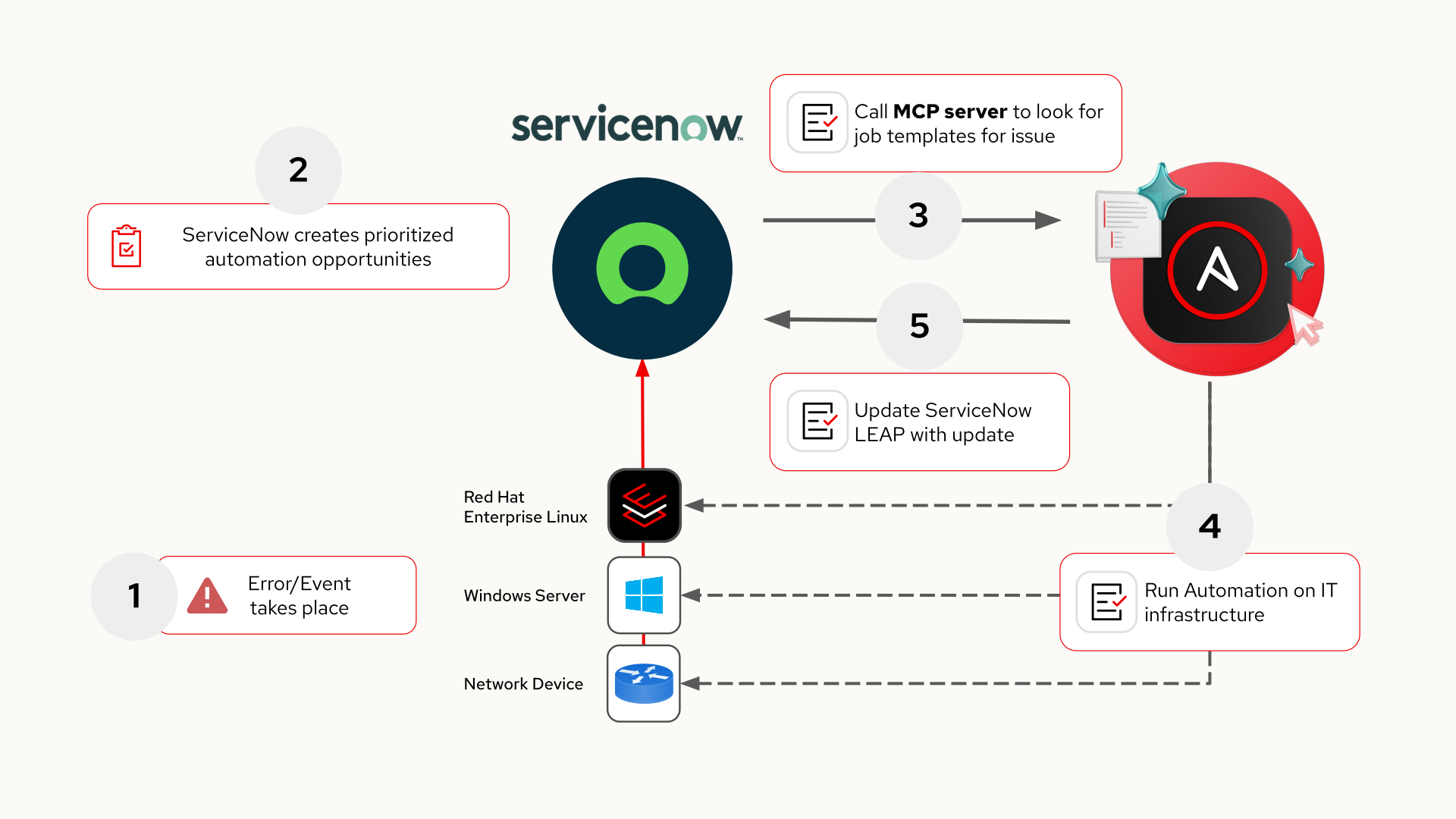
Logical flow:
ServiceNow Incident / Service Operations context
  → LEAP identifies or matches an automation opportunity
    → LEAP uses the Ansible Automation Platform MCP integration
      → AAP runs an approved Job Template or Workflow Job Template
        → Outcomes and status feed back into the ServiceNow / LEAP experience
Operational impact by stage
| Stage | Operational impact | Why it matters |
|---|---|---|
| LEAP opportunity mapping | Low (metadata and bindings in ITSM) | Associates approved AAP artifacts with recurring operational patterns |
| Connector + MCP | Low (integration configuration) | Defines trust path and credentials between ServiceNow and AAP |
| Playbook execution | Medium to High (infrastructure / application change) | This is real remediation – scope, limits, and approvals must match production policy |
MCP deployment topology and trust boundaries
Place the Ansible Automation Platform MCP server where your organization routes all third-party SaaS integrations: typically behind an HTTPS ingress (reverse proxy, API gateway, or load balancer) with TLS termination, allow lists, and optional mTLS between proxy and MCP. ServiceNow holds the integration identity (API token or OAuth secret); the MCP server never stores broad admin passwords in clear text – align with your vault and rotation policy.
flowchart LR
  SN[ServiceNow LEAP / Connectors]
  GW[Ingress API GW / WAF]
  MCP[AAP MCP server]
  AAP[Ansible Automation Platform]
  TGT[Managed endpoints]

  SN -->|HTTPS TLS| GW -->|HTTPS| MCP -->|REST OAuth RBAC| AAP -->|SSH WinRM APIs| TGT
Trust boundaries to document in your runbook: who can create API tokens, which job templates the integration user may launch, whether survey or limit is mandatory, and where job output is allowed to be copied back into ServiceNow (work notes vs system fields).
Prerequisites
Ansible Automation Platform
- Ansible Automation Platform 2.6+ with the MCP server for Ansible Automation Platform (confirm supported versions in your AAP release notes; older supported trains may allow 2.5+)
- A dedicated integration user or team-scoped service account with permission only for the job templates LEAP is allowed to run; prefer short-lived tokens and narrowly scoped permissions
- The Ansible Automation Platform MCP server endpoint deployed and reachable from ServiceNow (reverse proxy, mTLS, IP allow lists, health checks)
ServiceNow
- ServiceNow instance with LEAP available (demo navigation: Workspaces → Learning-Enhanced Automation Platform)
- Permissions to configure Connectors and run LEAP remediation flows (demo path: settings → Connectors → + Connect)
Featured Ansible Content Collections
| Collection | Type | Purpose |
|---|---|---|
| ansible.controller | Certified | Define job templates and AAP objects as code (pairs with Executable artifacts) |
| servicenow.itsm | Certified | Recommended: update incidents from an Ansible follow-up job after AAP completes (correlation IDs, work notes, multi-agent visibility) |
Solution Walkthrough
Note: UI labels may vary.
The screenshots and step names below match a reference ServiceNow instance. Adapt naming to your organization’s profiles, workspaces, and connector menus.
1. Create an AAP API token for the MCP integration
Goal: Create an Automation Platform credential that ServiceNow can use when calling the Ansible MCP server.
In Ansible Automation Platform:
- Go to Access Management
- Open API Tokens
- Select Create API token
- Fill in an optional description, set the token scope appropriately, then Create token
- Copy the token immediately (it may not be shown again)
2. Connect ServiceNow to the Ansible Automation Platform MCP server
Goal: Register the MCP integration inside ServiceNow so LEAP can call into AAP.
Starting from the ServiceNow dashboard home page:
- Open Workspaces → Learning-Enhanced Automation Platform (LEAP)
- Open settings (the demo calls out the settings control on the LEAP home page)
- Go to Connectors
- Click + Connect
- Enter the Ansible Automation Platform MCP server URL and API key (the API token from the previous step), then save
Success criteria: ServiceNow confirms the connector is saved and LEAP can reach the MCP endpoint (see Validation).
3. Map a LEAP opportunity to an AAP remediation playbook
Goal: Associate a LEAP “opportunity” with a validated Ansible remediation artifact so the right automation is available when an incident matches.
In LEAP:
- Find a LEAP opportunity and select Review
- Open Review details
- Confirm a valid remediation playbook is identified for the scenario (demo example: restoring a broken web application)
- Save and close the mapping workflow
Success criteria: The opportunity shows a matched AAP playbook and is ready for operational use.
4. Remediate an incident via LEAP (“Execute Ansible playbooks”)
Goal: Use the Service Operations experience to drive governed playbook execution through LEAP + MCP + AAP.
- Go to the Service Operations workspace
- Select an incident to remediate
- Choose Execute Ansible playbooks
- Use the LEAP assistant connected to AAP to request a resolution for the incident
- LEAP should confirm the service issue, match the incident to the correct AAP playbook, and run the playbook
- Verify the incident reaches the expected resolved state in ServiceNow after AAP completes successfully
Executable artifacts (YAML examples)
These excerpts mirror patterns used in higher-scoring guides: AAP-as-code for approved catalogs, plus a recommended servicenow.itsm follow-up so Ansible writes correlation data back to the incident independently of the LEAP polling cycle.
1. Governed job template (AAP as code)
Use ansible.controller.job_template (or awx.awx.job_template on community Galaxy if your standards allow) so remediation artifacts are reviewable in Git and promoted like any other automation.
---
- name: Example - ensure LEAP-facing remediation template exists
  hosts: localhost
  gather_facts: false
  vars:
    aap_host: "https://controller.example.com"
    aap_token: "{{ vault_aap_oauth_token }}"
  tasks:
    - name: Create or update governed job template
      ansible.controller.job_template:
        controller_host: "{{ aap_host }}"
        controller_oauth_token: "{{ aap_token }}"
        name: "LEAP - Restore web application"
        description: "Approved remediation for LEAP / MCP; restrict via RBAC and inventory limits."
        job_type: "run"
        playbook: "playbooks/remediate_webapp.yml"
        project: "Org - Trusted playbooks"
        inventory: "Production - Linux"
        execution_environment: "Supported EE - RHEL"
        credential:
          - "Prod - SSH automation"
          - "Prod - Vault lookup"
        ask_limit_on_launch: true
        ask_variables_on_launch: true
        state: present
Tune ask_limit_on_launch and surveys so operators (and LEAP-driven runs) cannot bypass blast-radius controls.
2. Recommended: ITSM follow-up with servicenow.itsm
Why recommended, not optional?
LEAP polls the MCP server to check job status, but that polling window is bounded by the LEAP session. A
servicenow.itsmfollow-up from AAP writes deterministic status back to the incident the moment the job finishes – regardless of whether the LEAP session is still active, whether the job ran asynchronously, or whether a human even triggered it. This makes AAP the authoritative record of what happened and when.
The bigger picture: multi-agent visibility. In production environments, LEAP is not the only client that may drive automation through AAP. AI coding agents (Cursor, Claude Code, Windsurf), ChatOps bots, scheduled workflows, and other MCP-capable clients can all launch job templates through the same AAP MCP server. When AAP writes the correlation data back to ServiceNow via servicenow.itsm, every agent and operator sharing that incident gets visibility into what ran – even if they did not originate the job. LEAP can then act on that new information (updated work notes, state changes) in subsequent interactions, creating a feedback loop that works across any combination of human and AI-driven automation.
---
- name: Correlate AAP job to ServiceNow incident
  hosts: localhost
  gather_facts: false
  vars:
    snow_instance: "yourcompany.service-now.com"
  tasks:
    - name: Append work note with remediation correlation
      servicenow.itsm.incident:
        instance:
          host: "{{ snow_instance }}"
          username: "{{ snow_api_user }}"
          password: "{{ snow_api_password }}"
        number: "{{ incident_number }}"
        state: present
        other:
          work_notes: |
            Ansible Automation Platform remediation completed.
            Job ID: {{ tower_job_id | default('unknown') }}
            Job template: {{ job_template_name | default('unknown') }}
            Status: {{ job_status | default('unknown') }}
      when: incident_number is defined
Use a dedicated ServiceNow integration user with least privilege (often read/update incident work notes only).
When to skip this step.
If your environment is strictly LEAP-only (no other AI agents, no async jobs, no out-of-band automation) and LEAP’s built-in polling gives you sufficient visibility, you can defer this step. Add it when you expand to multiple automation clients or need an audit-grade correlation trail.
Validation
| Checkpoint | What to verify | Success indicator |
|---|---|---|
| AAP token | Token scopes and user/team permissions | User can see only approved job templates in the UI; smoke-launch succeeds (see below) |
| ServiceNow connector | MCP URL + credential | Connector saves; LEAP surfaces playbooks tied to opportunities |
| Opportunity mapping | Playbook binding | Opportunity review shows the expected AAP job template or workflow |
| Execution | Incident-driven run | AAP shows a new job with expected template name; exit status matches policy |
Sample verification artifacts
Sanitize hostnames, tokens, and IDs before sharing. Below shapes are what you should expect when debugging.
1. AAP API – job template visible to integration user
curl -sS -H "Authorization: Bearer <AAP_TOKEN>" \
  "https://controller.example.com/api/v2/job_templates/?name__icontains=LEAP"
Example (truncated) response shape:
{
  "count": 1,
  "results": [
    {
      "id": 42,
      "name": "LEAP - Restore web application",
      "type": "job_template"
    }
  ]
}
2. AAP API – launch job (smoke test)
curl -sS -X POST \
  -H "Authorization: Bearer <AAP_TOKEN>" \
  -H "Content-Type: application/json" \
  "https://controller.example.com/api/v2/job_templates/42/launch/" \
  -d '{"limit":"web-prod-01.example.com"}'
Example (truncated) response:
{
  "job": 9876
}
3. Job completed successfully
curl -sS -H "Authorization: Bearer <AAP_TOKEN>" \
  "https://controller.example.com/api/v2/jobs/9876/"
Look for "status":"successful" and capture job_template / id for your incident correlation note.
4. Optional – ServiceNow incident API sanity check
curl -sS -u "integration_user:<PASSWORD>" \
  "https://yourcompany.service-now.com/api/now/table/incident?sysparm_query=number=INC0010001&sysparm_fields=number,state,work_notes"
Confirm work_notes contains your correlation block after the servicenow.itsm follow-up task runs.
Troubleshooting
| Symptom | Likely cause | Fix |
|---|---|---|
| Connector save fails | Wrong MCP base URL, TLS trust chain, or network path | Validate URL, certificates, egress/proxy allow lists, and MCP health outside ServiceNow |
| LEAP can’t list/playbooks | Token scope too narrow or wrong AAP user | Recreate token with correct RBAC; confirm the user can see the job template in AAP |
| Playbook runs but wrong target | Inventory/limit mismatch or survey vars missing | Standardize surveys/extra vars; enforce limits via approved job templates |
| “Success” in UI but service still broken | Playbook is incomplete or verification step is insufficient | Add post-check tasks; gate “resolved” updates on objective health checks |
| 401/403 from AAP API | Expired token or wrong OAuth scope | Rotate token; verify user belongs to team that owns the template |
Security, Governance, and Operational Risk
Unlike “ticket-only enrichment” patterns, executing Ansible changes infrastructure and application state. Treat this integration as production automation:
- Prefer least privilege on the AAP token and integration user; scope to only the job templates/workflows required
- Use approved job templates/workflows (don’t expose arbitrary playbook execution)
- Enforce change controls: approvals, maintenance windows, and/or human gates where required
- Treat MCP like any integration endpoint: protect with TLS, monitoring, and rotation for API keys/tokens
- Audit everything: AAP job output + ServiceNow history should tell the same story
Maturity Path
| Maturity | What LEAP + AAP MCP enables | Typical gating |
|---|---|---|
 Crawl Crawl |
Standardize the connector + map a small set of “golden path” playbooks | Manual selection; narrow incident categories |
 Walk Walk |
Expand opportunity mapping catalog; add surveys/limits; integrate approvals | Change management + playbook reviews |
 Run Run |
Higher-confidence matching + broader coverage + policy guardrails | Automated guardrails, SLO-driven execution, continuous verification |
Measuring success
Quantify adoption the same way top guides anchor business outcomes to observable signals:
| Metric | What good looks like | How to measure |
|---|---|---|
| MTTR for mapped scenarios | Down vs baseline after LEAP + MCP go-live | ITSM timestamps (open → resolved) for incidents tagged to LEAP-mapped categories |
| Repeat incident rate | Fewer reopen tickets for the same root cause | Problem/incident correlation IDs in ServiceNow over 30/90 days |
| Automation reuse | Same certified job template used across many incidents | AAP job runs per template ID; LEAP opportunity linkage |
| Governance coverage | No unauthorized templates executed via integration | AAP RBAC audits; token scoped user cannot launch non-approved templates |
| Audit completeness | Every remediation ties ITSM ↔ job ID ↔ host change | Work notes from servicenow.itsm follow-up; AAP job id in notes |
Summary
ServiceNow LEAP helps operations teams move from “we have incidents” to “we have repeatable, governed remediation.” By connecting LEAP to Ansible Automation Platform through an MCP server, teams can surface the right playbook, run it with AAP controls, and close the loop back in ServiceNow – reducing MTTR, removing silos, and making automation operational rather than theoretical.
Related Guides
- AIOps reference architecture: AIOps automation with Ansible
 EDA (alternate trigger pattern): Get started with EDA (Ansible Rulebook)
 ServiceNow enrichment: ServiceNow ITSM Ticket Enrichment Automation
Next Steps
| Try Ansible Automation Platform | Start a free 60-day trial and build your first automation workflows |
| Red Hat Consulting | Work with Red Hat experts to design, implement, and scale AIOps automation tailored to your environment |
| Training and Certification | Build team skills with hands-on courses and industry-recognized certifications |