AIOps with AWS SQS and Event-Driven Ansible
Solution Guide


Overview
AWS-centric organizations generate thousands of infrastructure events daily – CloudWatch alarms, EC2 state changes, Lambda errors, S3 access anomalies – all funneling through Amazon SQS queues. Without automation, operations teams manually poll these queues, triage each message, and write one-off fixes. This guide demonstrates how to connect AWS SQS to the AIOps self-healing pipeline using Event-Driven Ansible (EDA), so that events flowing through SQS automatically trigger AI-diagnosed, dynamically remediated incidents via Ansible Automation Platform.
| Approach | Events | Rules Required | Actions |
|---|---|---|---|
| Traditional EDA | 10 | 10 | 10 |
| Traditional EDA | 100 | 100 | 100 |
| Traditional EDA | 1,000 | 1,000 | 1,000 |
| AIOps with EDA + SQS | 1,000 | 1 (+ AI inference) | Dynamic |
By inserting AI inference between SQS events and Ansible remediation, a single intelligent workflow replaces hundreds of hand-coded rules. This guide walks through the full pipeline – from SQS event ingestion through AI diagnosis to automated playbook generation and execution.
This guide focuses on the SQS integration.
The overall AIOps workflow is covered in depth in the companion guide AIOps automation with Ansible. This guide focuses specifically on using AWS SQS as the message queue component and covers AWS-specific configuration, EDA rulebook setup, and IAM considerations.
Background

Amazon Simple Queue Service (SQS) is a fully managed message queuing service that decouples event producers from consumers at any scale. In AWS environments, SQS is the natural integration point for event-driven architectures – CloudWatch Alarms, EventBridge rules, SNS topics, and custom applications all publish messages to SQS queues, which downstream consumers process asynchronously.
In an AIOps context, SQS serves as the event transport layer between AWS infrastructure and Event-Driven Ansible. Rather than building custom polling scripts or Lambda functions to react to every type of AWS event, EDA subscribes directly to SQS queues and triggers automation workflows based on the message content. This decoupling means:
- Durability: SQS retains messages for up to 14 days, so events are never lost even if EDA is temporarily unavailable.
- Scalability: SQS handles any volume of events without requiring you to manage broker infrastructure.
- Flexibility: Any AWS service or third-party tool that can write to SQS becomes an event source for Ansible automation.
Why SQS over SNS or EventBridge directly?
SNS is a push-based pub/sub service – it delivers messages immediately and discards them if the subscriber is unavailable. EventBridge is a serverless event bus that routes events based on rules. SQS adds a buffering layer that guarantees message delivery even when the consumer (EDA) is temporarily down. For AIOps workflows, this durability is critical – you don’t want to miss an infrastructure event because EDA was restarting during a deployment.
Solution
What makes up the solution?
 Amazon SQS as the event transport layer [Link]
 Event-Driven Ansible (EDA) to consume SQS messages and trigger workflows [Link]
 Red Hat AI for understanding service issues [Link]
 Automation code assistant to generate remediation playbooks (workshop Run only) [Link]
 Ansible Automation Platform (AAP) workflows for orchestration [Link]
EDA is part of Ansible Automation Platform.
EDA uses rulebooks to monitor events, then executes specified job templates or workflows based on the event. EDA is an automatic way for inputs into Ansible Automation Platform, where Ansible Automation Platform is the output (running a job template or workflow).
Who Benefits
| Persona | Challenge | What They Gain |
|---|---|---|
 IT Ops Engineer / SRE IT Ops Engineer / SRE |
Manually polling SQS queues, triaging CloudWatch alarms, and writing Lambda functions for each failure scenario | Automated event consumption from SQS, AI-generated diagnosis, and dynamically generated playbooks – less custom code, faster recovery |
 Automation Architect Automation Architect |
Connecting AWS event infrastructure to Ansible without building custom middleware or Lambda glue code | A reference architecture for bridging AWS SQS, EDA, AI inference, and playbook generation – no custom code required |
 IT Manager / Director IT Manager / Director |
Justifying AIOps investment in an AWS-centric environment and reducing MTTR for cloud infrastructure incidents | Incremental adoption path (Crawl -> Walk -> Run), leverages existing AWS infrastructure, and measurable reduction in manual intervention |
Prerequisites
Ansible Automation Platform
- Ansible Automation Platform 2.5+ – Required for enterprise Event-Driven Ansible support.
Featured Ansible Content Collections
| Collection | Type | Purpose |
|---|---|---|
| ansible.eda | Certified | EDA event sources and filters (includes aws_sqs_queue source plugin) |
| amazon.aws | Certified | AWS resource management (EC2, S3, CloudWatch, SQS) |
| ansible.controller | Certified | AAP configuration as code (job templates, workflows, surveys) |
| ansible.scm | Certified | Git operations (commit and push generated playbooks) |
| infra.ai | Validated | Provisions RHEL AI infrastructure (AWS, Azure, GCP, bare metal) |
| redhat.ai | Certified | Configures and serves AI models using InstructLab |
Red Hat AI only: Deploy your own inference endpoint?
The
infra.aiandredhat.aicollections automate Red Hat AI on your infrastructure – from provisioning a GPU instance to serving a model with RHEL AI and InstructLab. They do not replace generic OpenAI-compatible APIs or partner-hosted inference. See the companion guide AI Infrastructure automation with Ansible for a complete walkthrough.
External Systems
| System | Required | Examples |
|---|---|---|
| AWS account with SQS access | Yes | Standard or FIFO SQS queue |
| AWS IAM credentials | Yes | Access key / secret key or IAM role with sqs:ReceiveMessage, sqs:DeleteMessage, sqs:GetQueueUrl |
| Observability tool | Yes | AWS CloudWatch, Filebeat, IBM Instana, Splunk, Dynatrace |
| AI inference endpoint | Yes | Red Hat AI (RHEL AI + InstructLab) or any OpenAI-compatible API |
| Automation code assistant | Yes | Workshop Run codegen (Red Hat AI, IBM watsonx, or Gemini backends) – not Red Hat Lightspeed curated remediations |
| Git repository | Yes | GitHub, GitLab, Gitea |
| Chat or ITSM tool | Recommended | Mattermost, Slack, ServiceNow |
AIOps with SQS Workflow
Production Walk path:
After enrichment, use AAP MCP to search approved job templates, let AI select from the library, and launch a governed run. See curated automation remediation. The four parts below follow the workshop Run pipeline with AWS SQS as the message queue.
The AIOps workflow has four (4) parts:
-
Event-Driven Ansible (EDA) Response with SQS
AWS infrastructure events flow into an SQS queue. EDA polls the queue and triggers the enrichment workflow. This is the Observability part of the AIOps pipeline.
-
Log Enrichment and Prompt Generation Workflow
AAP coordinates with Red Hat AI, notifies your chat application or ITSM. This is the Inference part of the AIOps pipeline.
-
Remediation Workflow (workshop Run demo)
Generates a playbook via Automation code assistant, syncs it to Git, builds a Job Template. At Walk, use AAP MCP to select an existing template instead of incident-time codegen.
-
Execute Remediation
The final Job Template fixes the issue on your IT infrastructure. This is the Automation part of AIOps.
Operational Impact per Stage
| Stage | Operational Impact | Why |
|---|---|---|
| 1. EDA + SQS | None | Read-only – EDA polls SQS and triggers a workflow. No changes to infrastructure. |
| 2. Enrichment Workflow | Low | Collects logs, calls an AI API, posts to chat/ITSM. No infrastructure changes. |
| 3. Remediation Workflow | Low | Generates a playbook, commits to Git, creates a Job Template. Prepares the fix but does not touch production. |
| 4. Execute Remediation | High | Modifies production infrastructure. Should go through a change window or approval gate. |
Example Workflow Diagram
AWS Event (CloudWatch/EventBridge/App)
         │
         ▼
    ┌─────────┐
    │ AWS SQS │  ← Event transport (buffered, durable)
    └────┬────┘
         │
         ▼
    ┌─────────┐
    │  EDA    │  ← ansible.eda.aws_sqs_queue source plugin
    └────┬────┘
         │
         ▼
    ┌──────────────────────────┐
    │  Enrichment Workflow     │  ← Capture logs, AI diagnosis, notify ITSM
    └────┬─────────────────────┘
         │
         ▼
    ┌──────────────────────────┐
    │  Remediation Workflow    │  ← Automation code assistant generates playbook, commit to Git
    └────┬─────────────────────┘
         │
         ▼
    ┌──────────────────────────┐
    │  Execute Remediation     │  ← Run the AI-generated fix
    └──────────────────────────┘
This is a high level diagram.
It shows an opinionated approach using AWS SQS as the event transport. The downstream workflow stages are identical to the general AIOps pipeline.
1. Event-Driven Ansible (EDA) Response with SQS
The first part of the AIOps workflow is getting events from AWS into Event-Driven Ansible via SQS. Here is a breakdown:
- AWS infrastructure event occurs
- Event lands in an SQS queue (via CloudWatch, EventBridge, SNS, or direct publish)
- EDA polls the SQS queue using the
ansible.eda.aws_sqs_queuesource plugin - EDA triggers the Enrichment Workflow
AWS Events That Feed SQS
There are multiple ways to route AWS events into SQS:
| Event Source | How It Reaches SQS | Example Events |
|---|---|---|
| CloudWatch Alarms | CloudWatch Alarm -> SNS Topic -> SQS Queue | CPU > 90%, disk full, unhealthy ALB targets |
| EventBridge Rules | EventBridge Rule -> SQS Queue (direct target) | EC2 state changes, ECS task failures, GuardDuty findings |
| SNS Topics | SNS -> SQS subscription | Multi-subscriber fan-out from any AWS service |
| Custom Applications | Application code publishes directly to SQS | Application errors, health check failures, batch job completions |
| AWS CloudTrail | CloudTrail -> EventBridge -> SQS | IAM policy changes, security group modifications, unauthorized API calls |
Why route through SQS instead of triggering EDA directly?
SQS provides message durability (up to 14-day retention), built-in dead-letter queues for failed processing, and at-least-once delivery guarantees. If EDA is restarting during a deployment or temporarily unavailable, messages wait in the queue rather than being lost. This is critical for production AIOps pipelines where missing an event could mean missing a security incident or outage.
Configuring SQS for EDA
Before EDA can consume messages, you need an SQS queue and appropriate IAM permissions. You can automate this setup with the amazon.aws collection:
- name: Create SQS queue for EDA events
  amazon.aws.sqs_queue:
    name: eda-aiops-events
    region: us-east-1
    default_visibility_timeout: 300
    message_retention_period: 86400
    receive_message_wait_time_seconds: 20
    tags:
      Purpose: aiops-eda
      ManagedBy: ansible
  register: sqs_queue

- name: Display queue URL
  ansible.builtin.debug:
    msg: "SQS Queue URL: {{ sqs_queue.queue_url }}"
default_visibility_timeout: How long a message is hidden from other consumers after EDA picks it up (300 seconds gives the workflow time to process).message_retention_period: How long unprocessed messages are retained (86400 = 1 day).receive_message_wait_time_seconds: Enables long polling (20 seconds) to reduce empty responses and API costs.
Use long polling.
Setting
receive_message_wait_time_secondsto 20 enables long polling, which reduces the number of emptyReceiveMessageAPI calls and lowers SQS costs. Without it, EDA makes frequent short-poll requests that return empty responses.
IAM Policy for EDA
The IAM credentials used by EDA need the following minimum permissions:
{
  "Version": "2012-10-17",
  "Statement": [
    {
      "Effect": "Allow",
      "Action": [
        "sqs:ReceiveMessage",
        "sqs:DeleteMessage",
        "sqs:GetQueueAttributes",
        "sqs:GetQueueUrl"
      ],
      "Resource": "arn:aws:sqs:us-east-1:123456789012:eda-aiops-events"
    }
  ]
}
RBAC: Scope IAM permissions tightly.
Only grant the four SQS actions listed above, scoped to the specific queue ARN. EDA does not need
sqs:SendMessageorsqs:CreateQueue. Use a dedicated IAM user or role for EDA – do not share credentials with other services.
Setting Up a CloudWatch Alarm to SQS Pipeline
A common pattern is routing CloudWatch Alarms through SNS into SQS. Here is an example using the amazon.aws collection:
- name: Create SNS topic for CloudWatch alarms
  amazon.aws.sns_topic:
    name: cloudwatch-to-eda
    region: us-east-1
    subscriptions:
      - endpoint: "{{ sqs_queue.queue_arn }}"
        protocol: sqs
  register: sns_topic

- name: Create CloudWatch alarm for high CPU
  amazon.aws.cloudwatch_metric_alarm:
    alarm_name: high-cpu-web-server
    metric_name: CPUUtilization
    namespace: AWS/EC2
    statistic: Average
    period: 300
    evaluation_periods: 2
    threshold: 90.0
    comparison_operator: GreaterThanOrEqualToThreshold
    alarm_actions:
      - "{{ sns_topic.sns_arn }}"
    dimensions:
      InstanceId: i-0abcdef1234567890
    region: us-east-1
This creates a pipeline: EC2 CPU > 90% -> CloudWatch Alarm -> SNS Topic -> SQS Queue -> EDA.
EDA Rulebook for SQS
The ansible.eda.aws_sqs_queue source plugin connects EDA to an SQS queue. Here is a production-ready rulebook:
---
- name: AIOps - AWS SQS event listener
  hosts: all
  sources:
    - ansible.eda.aws_sqs_queue:
        queue_name: eda-aiops-events
        region: us-east-1
        access_key: "{{ aws_access_key }}"
        secret_key: "{{ aws_secret_key }}"
        delay_seconds: 2

  rules:
    - name: CloudWatch alarm triggered
      condition: event.body.Type is defined and event.body.Type == "Notification"
      action:
        run_workflow_template:
          organization: "Default"
          name: "AI Insights and Lightspeed prompt generation"

    - name: EC2 state change - instance stopped
      condition: event.body.detail is defined and event.body.detail.state == "stopped"
      action:
        run_workflow_template:
          organization: "Default"
          name: "AI Insights and Lightspeed prompt generation"

    - name: Log all SQS messages
      condition: event.body is defined
      action:
        debug:
          msg: "SQS event received: {{ event.body }}"
queue_name: The name of the SQS queue to poll.region: The AWS region where the queue exists.access_key/secret_key: AWS IAM credentials (store these in Ansible vault or AAP credentials, never in plain text).delay_seconds: How often EDA polls the queue (2 seconds provides near-real-time response).
Store AWS credentials securely.
Use AAP’s credential management to store
aws_access_keyandaws_secret_key. You can create a custom credential type for AWS SQS or use the built-in Amazon Web Services credential type. Never hardcode credentials in rulebooks or playbooks.
SQS Message Format
When CloudWatch Alarms flow through SNS into SQS, the message body contains an SNS notification wrapper. Here is an example of what EDA receives:
{
  "Type": "Notification",
  "MessageId": "a1b2c3d4-e5f6-7890-abcd-ef1234567890",
  "TopicArn": "arn:aws:sns:us-east-1:123456789012:cloudwatch-to-eda",
  "Subject": "ALARM: high-cpu-web-server",
  "Message": "{\"AlarmName\":\"high-cpu-web-server\",\"NewStateValue\":\"ALARM\",\"NewStateReason\":\"Threshold Crossed: 2 out of 2 datapoints were >= 90.0\"}",
  "Timestamp": "2026-03-10T14:30:00.000Z"
}
The condition in the rulebook filters on fields in this JSON payload to determine which events should trigger the AIOps workflow.
2. Log Enrichment and Prompt Generation Workflow
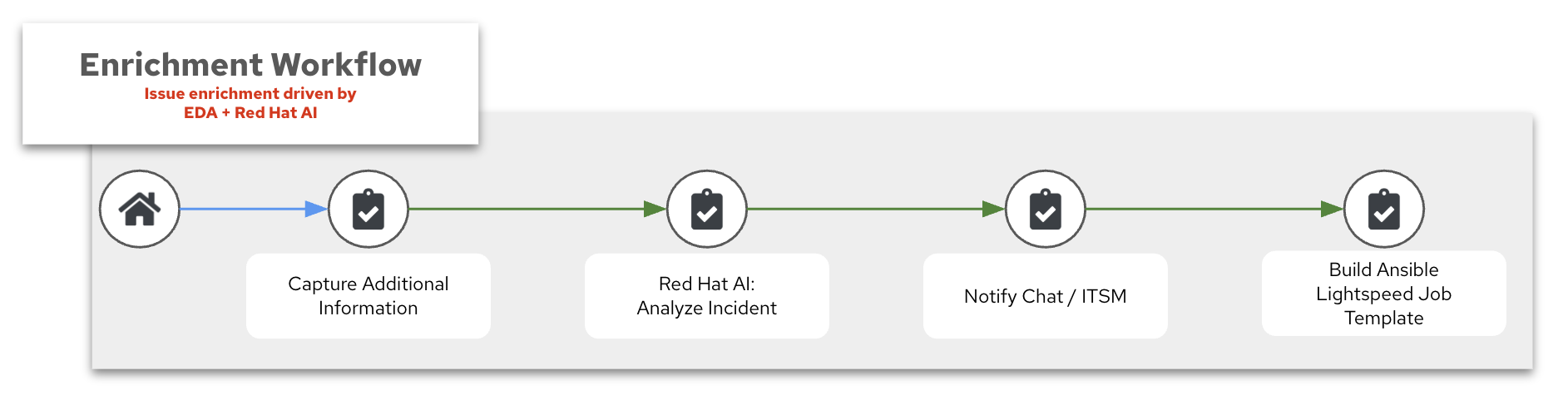
Once EDA receives an event from SQS and triggers the workflow, the Enrichment Workflow runs identically to the general AIOps pipeline. See AIOps automation with Ansible – Log Enrichment and Prompt Generation Workflow for the full walkthrough.
The four components:
- Capture Additional Information
- Red Hat AI: Analyze Incident
- Notify Chat / ITSM
- Build Automation code assistant job template
1. Capture Additional Information
For AWS-sourced events, the additional information capture step can leverage the amazon.aws collection to pull context directly from AWS:
    - name: Get EC2 instance details
      amazon.aws.ec2_instance_info:
        instance_ids:
          - "{{ event_instance_id }}"
        region: "{{ aws_region }}"
      register: ec2_info

    - name: Get recent CloudWatch metrics
      amazon.aws.cloudwatch_metric_alarm_info:
        alarm_names:
          - "{{ event_alarm_name }}"
        region: "{{ aws_region }}"
      register: alarm_info

    - name: Collect system logs from affected host
      ansible.builtin.shell:
        cmd: journalctl -u {{ affected_service }} --since "10 minutes ago" --no-pager
      register: system_logs
      delegate_to: "{{ affected_host }}"
This gathers EC2 instance metadata, CloudWatch alarm details, and system logs from the affected host – all of which enrich the prompt sent to Red Hat AI.
2. Red Hat AI: Analyze Incident
The AI analysis step is identical to the general AIOps workflow. The enriched context from the SQS event and AWS metadata is passed as part of the prompt:
    - name: Analyze incident with Red Hat AI
      redhat.ai.completion:
        base_url: "http://{{ rhelai_server }}:{{ rhelai_port }}"
        token: "{{ rhelai_token }}"
        prompt: |
          An AWS CloudWatch alarm has triggered. Analyze the following incident and
          provide a root cause diagnosis and recommended remediation steps.

          Alarm: {{ event_alarm_name }}
          Instance: {{ ec2_info.instances[0].instance_id }}
          Instance Type: {{ ec2_info.instances[0].instance_type }}
          State Reason: {{ alarm_info.metric_alarms[0].state_reason }}

          System logs:
          {{ system_logs.stdout }}
        model_path: "/root/.cache/instructlab/models/granite-8b-lab-v1"
      delegate_to: localhost
      register: gpt_response
3. Notify Chat / ITSM
Post the AI-generated diagnosis to your team’s communication channel. See the AIOps guide – Notify Chat / ITSM for Mattermost, ServiceNow, and Slack examples.
4. Build Automation code assistant job template
This step creates (or updates) the Job Template with the AI-generated insights for the Remediation Workflow. The implementation matches the UC06 workshop appendix – Build Automation code assistant job template.
3. Remediation Workflow
The Remediation Workflow generates an Ansible Playbook via Automation code assistant, commits it to Git, syncs the project, and builds a Job Template. This workflow is identical across all AIOps integrations regardless of the event source.
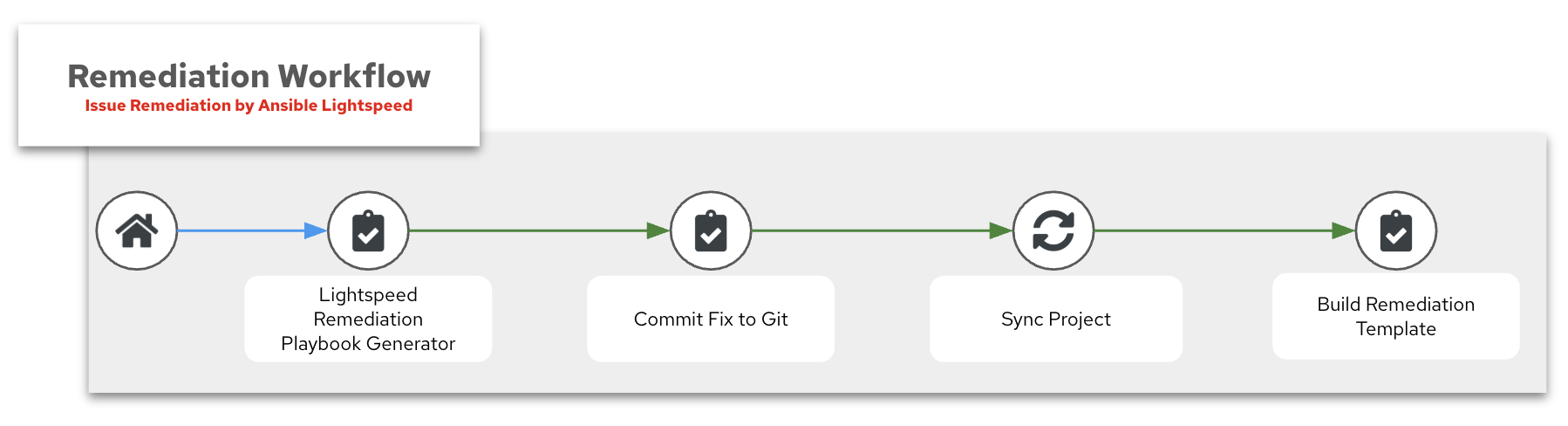
- Automation code assistant remediation playbook generator (workshop job names may still say Lightspeed)
- Commit Fix to Git
- Sync Project
- Build Remediation Template
See Self-healing infrastructure – Remediation Workflow (workshop appendix) for the complete walkthrough of each step.
1. Automation code assistant remediation playbook generator
    - name: Send request to Automation code assistant API
      ansible.builtin.uri:
        url: "{{ input_lightspeed_url | default('https://c.ai.ansible.redhat.com/api/v0/ai/generations/') }}"
        method: POST
        headers:
          Content-Type: "application/json"
          Authorization: "Bearer {{ lightspeed_wca_token }}"
        body_format: json
        body:
          text: "{{ lightspeed_prompt }}"
      register: response
2. Commit Fix to Git
    - name: Commit and push playbook to Git
      ansible.scm.git_publish:
        path: "{{ repository['path'] }}"
        token: "{{ git_token }}"
3. Sync Project
Use the Project Sync node in the Workflow Visualizer to pull the latest playbook from Git into AAP.
4. Build Remediation Template
    - name: Create Remediation Job Template
      ansible.controller.job_template:
        name: "Execute AWS Remediation"
        job_type: "run"
        inventory: "{{ input_inventory | default('AWS Inventory') }}"
        project: "{{ input_project | default('Lightspeed-Playbooks') }}"
        playbook: "{{ input_playbook | default('lightspeed-response.yml') }}"
        credential: "{{ input_credential | default('aws-credential') }}"
        validate_certs: true
        execution_environment: "Default execution environment"
        become_enabled: true
        ask_limit_on_launch: true
4. Execute Remediation
The final step runs the AI-generated remediation playbook against the affected AWS infrastructure. This is the high-impact stage where production systems are modified.
See AIOps automation with Ansible – Execute Remediation for the full discussion of manual vs. automated execution and policy enforcement considerations.
AWS-specific consideration for approval gates.
If your organization uses AWS Systems Manager Change Manager, consider integrating the approval gate with SSM change requests so that Ansible remediation jobs are tracked in both AAP and AWS governance tools.
Validation
Validate each stage of the pipeline independently:
| Stage | What to Verify | How to Test | Success Indicator |
|---|---|---|---|
| SQS Queue | Messages are arriving in the queue | Send a test message: aws sqs send-message --queue-url $QUEUE_URL --message-body '{"test": "eda-validation"}' |
Message appears in SQS console or via aws sqs receive-message |
| EDA + SQS | EDA is polling and receiving messages | Check AAP – rulebook activation should show as Running | Event log shows received SQS messages |
| Enrichment Workflow | AI analyzed the incident and notifications were sent | Trigger a test alarm; check Workflow Visualizer | All workflow nodes green; chat/ITSM received the AI diagnosis |
| Remediation Workflow | Automation code assistant generated a playbook and it was committed | Check Git repo for new playbook; verify Job Template was created | Playbook file exists in repo; Job Template points to correct playbook |
| Execute Remediation | The AI-generated playbook resolved the issue | Run the remediation Job Template | Job completes successfully; service returns to steady state |
End-to-End Test
Send a test message to SQS that simulates a CloudWatch alarm and verify the full pipeline fires:
aws sqs send-message \
  --queue-url https://sqs.us-east-1.amazonaws.com/123456789012/eda-aiops-events \
  --message-body '{
    "Type": "Notification",
    "Subject": "ALARM: test-high-cpu",
    "Message": "{\"AlarmName\":\"test-high-cpu\",\"NewStateValue\":\"ALARM\",\"NewStateReason\":\"Threshold Crossed: test event for AIOps pipeline validation\"}"
  }'
Want hands-on validation?
The companion workshop Hands-On AIOps: Building Self-Healing, Observability-Driven Automation with Ansible walks through the full AIOps pipeline end-to-end with a live lab environment.
Troubleshooting
| Symptom | Likely Cause | Fix |
|---|---|---|
| EDA rulebook is active but no events appear | IAM credentials lack sqs:ReceiveMessage permission |
Verify the IAM policy grants the four required SQS actions on the correct queue ARN |
| Messages stay in the queue (not consumed) | Wrong queue_name or region in the rulebook |
Compare the rulebook configuration against the actual SQS queue name and region |
| EDA receives events but workflow never launches | Event payload doesn’t match rulebook condition |
Send a test message and inspect the raw event.body with the debug rule; adjust the condition to match |
SQS returns AccessDenied errors |
Queue policy blocks the IAM user/role | Add an SQS queue policy that allows the EDA IAM principal to perform the required actions |
| Messages are received but disappear before processing completes | Visibility timeout is too short | Increase default_visibility_timeout on the SQS queue (recommendation: at least 300 seconds) |
| High SQS API costs | Short polling (no long polling configured) | Set receive_message_wait_time_seconds to 20 on the queue |
AIOps Maturity Path
Self-Healing Infrastructure: Crawl, Walk, Run
| Maturity | Approach | How It Works | AI Role |
|---|---|---|---|
 Crawl Crawl |
Ticket Enrichment | EDA consumes SQS events -> AI diagnoses root cause -> enriched context posted to chat/ITSM -> human remediates manually | Read-only: AI interprets, humans act |
 Walk Walk |
Curated Remediation | EDA consumes SQS events -> AI diagnoses root cause -> AI selects the right playbook from a pre-approved library -> human approves -> playbook executes | AI selects from existing automation |
 Run Run |
Self-Healing | EDA consumes SQS events -> AI diagnoses root cause -> Automation code assistant generates a new remediation playbook -> policy engine validates -> playbook executes | AI generates new automation on-the-fly |
This guide demonstrates the Run stage. Organizations can start at Crawl by using only the Enrichment Workflow (stages 1-2) and stopping before the Remediation Workflow.
Summary
With AWS SQS as the event transport, your AIOps pipeline gains the durability and scalability of a fully managed message queue without the overhead of running your own broker infrastructure. Events from CloudWatch, EventBridge, SNS, or any application that publishes to SQS automatically flow into Event-Driven Ansible, where AI inference diagnoses the root cause and Automation code assistant generates remediation playbooks on-the-fly in workshop Run scenarios. The result is a cloud-native self-healing architecture that leverages your existing AWS infrastructure and reduces mean time to resolution (MTTR) without writing custom Lambda functions or polling scripts.
Related Guides
- Full AIOps reference architecture: AIOps automation with Ansible – curated MCP selection at Walk, workshop codegen at Run, and SQS as one event transport option.
- Need to deploy the AI backend? See AI Infrastructure automation with Ansible for automating Red Hat AI provisioning with the
infra.aiandredhat.aicollections.  Want to try this hands-on? The Hands-On AIOps Workshop walks through the full self-healing pipeline with a live lab.
- New to Event-Driven Ansible? See Get started with EDA (Ansible Rulebook) for the fundamentals.
 Looking for ticket enrichment? See ServiceNow ITSM Ticket Enrichment Automation – a great starting point for the Crawl stage of AIOps.